

Product specification tables for Shopify stores
Turn dense product details into tables shoppers can scan before they compare, choose, and buy.
Quick answer
Product specification tables help when product pages include details that are too important to hide in paragraphs: dimensions, materials, compatibility, care instructions, certifications, variant differences, and technical specs. For Shopify stores, TableFlow is the Activory app built for this workflow. It can display product metafields, variant metafields, product groups, display conditions, and responsive table layouts without forcing every page into custom HTML.
When it helps
Specs influence the purchase
Use a table when shoppers need to compare dimensions, materials, features, or compatibility before they trust the product.
Data changes by variant
Variant-aware specification rows keep size, material, capacity, and model data accurate as shoppers select options.
Metafields are already your source of truth
Structured data should stay in Shopify custom data instead of being copied into static product descriptions.
Empty values need to stay clean
Good tables hide missing rows or blank tables so product pages do not feel unfinished.
Table content
- Product dimensions, weights, and materials.
- Variant-specific specs such as size, color, capacity, or model fit.
- Compatibility notes for parts, accessories, devices, or bundles.
- Care, warranty, shipping, or safety details.
- Comparison rows for product families or similar items.
Planning checklist
Start by separating the information shoppers need before purchase from the information staff needs after purchase. A good product specification table should answer buying questions quickly: Will this fit? What material is it? Which model is compatible? What is included? What changes between variants? If a row does not help a shopper decide, it may belong in internal documentation instead.
Next, decide where the data should live. If the same type of information appears across many products, Shopify metafields are usually cleaner than hand-written product descriptions. Metafields give the team a repeatable place to update values, and they make it easier to reuse table layouts across products. For variant-specific details, use variant metafields when the selected option changes the answer.
Then plan the table layout. Keep labels short, group related rows, and avoid turning every possible attribute into a visible row. A table with twelve useful rows is usually better than a table with thirty rows that shoppers skim past. Mobile shoppers should be able to read the labels and values without pinching, sideways scrolling, or losing the product context.
Common mistakes
The first mistake is copying unstructured product-description text into a table without cleaning it. Tables work best when each row has one clear label and one clear answer. The second mistake is showing blank values. If a product has no warranty row, no ingredient row, or no compatibility row, the table should hide that row instead of displaying empty cells.
Another common issue is mixing product-level and variant-level data. A material that applies to every variant can live at the product level. A size, capacity, or model-specific detail often belongs to the selected variant. Keeping those sources separate prevents shoppers from seeing the wrong specification after choosing an option.
Screenshot example
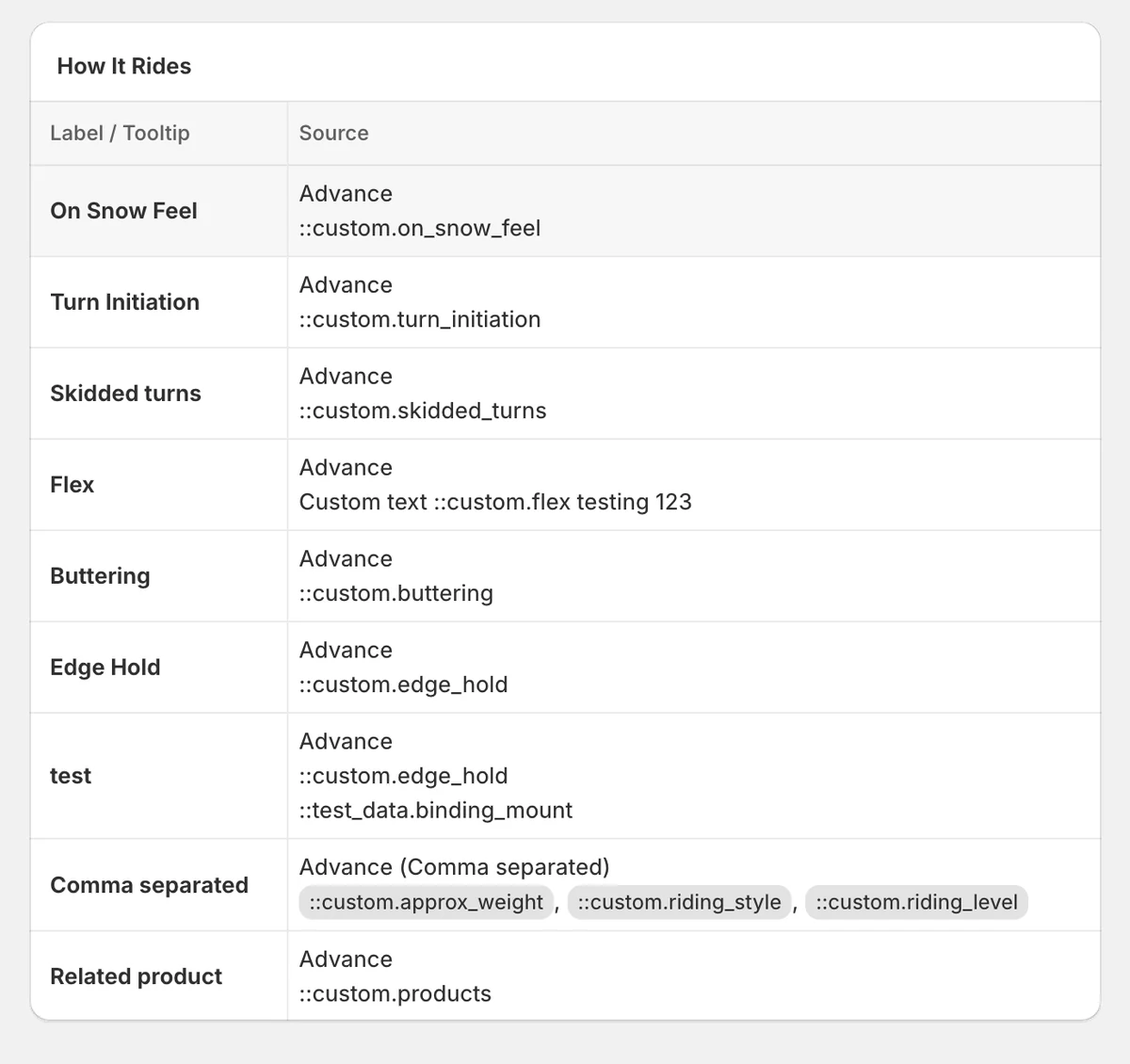
This table preview shows how TableFlow can combine plain labels with advanced metafield sources, custom text, comma-separated values, and related product data in one structured specification table.
TableFlow fit
TableFlow is the best fit when your product data belongs in structured specification tables. Start with the metafield guide if your store already uses Shopify custom data, or use table locations to place specs in the right storefront section.
FAQ
Should specs go in a table or in the product description?
Use a table when shoppers need to scan or compare details. Use the product description for narrative selling, product story, benefits, and context.
Should I use product metafields or variant metafields?
Use product metafields when the value applies to the whole product. Use variant metafields when the answer changes by size, color, model, capacity, or another selected option.
How long should a product specification table be?
Long enough to answer the buying questions, but short enough to scan. Group important rows first, and hide empty values so the page stays clean.
Make product specs easier to compare
Use TableFlow when product details need structure, responsive layouts, and clean metafield-powered updates.