

Custom product fields for Shopify stores
Collect the information a custom order needs before the shopper reaches checkout.
Quick answer
Custom product fields help when Shopify variants cannot capture every detail required for a product or order. Merchants use them for engraving text, names, dates, delivery notes, measurements, file instructions, gift messages, allergies, service choices, and made-to-order details. COLY is the Activory app built for this workflow, with required fields, conditional logic, product-page forms, cart and order data, and export-friendly order details.
When it helps
Variants would become too messy
Use custom fields when a text input, note, date, or conditional option is clearer than creating many product variants.
The order cannot be fulfilled without details
Required fields help merchants collect names, measurements, instructions, or delivery details before checkout.
Some fields should only appear sometimes
Conditional logic keeps forms shorter by showing fields only when the shopper selects a relevant option.
Staff need clean order exports
Order data should be easy to find, review, and export so fulfillment teams do not chase missing information.
Field ideas
- Engraving, monogram, or personalization text.
- Delivery notes, event dates, and pickup instructions.
- Measurements, sizing details, or service preferences.
- Gift messages and recipient information.
- Allergy notes, dietary requirements, or special handling details.
Planning checklist
Start by deciding which details are required to fulfill the order and which details are optional. Required fields should be reserved for information the team truly needs before checkout, such as engraving text, delivery date, measurement, or allergy note. Optional fields are better for preferences, gift messages, or extra instructions that improve service but should not block purchase.
Next, decide whether the field belongs on every product or only specific products. A personalized necklace may need initials and character limits. A bakery item may need pickup date, allergy notes, and message text. A made-to-order product may need dimensions and reference notes. Showing all fields on all products makes the form feel heavier than it needs to be.
Plan how staff will read the data later. The storefront form is only half the workflow. The captured details should be easy to find in the cart, confirmation flow, order admin, and exports. Use clear field labels so the fulfillment team does not have to guess what a shopper meant.
Common mistakes
The biggest mistake is using variants for information that is really a custom input. If a shopper needs to type a name, choose a date, leave a note, or provide measurements, a field is usually cleaner than creating many variant combinations. Another mistake is making every field required. Required fields should reduce fulfillment risk, not create checkout friction.
Avoid vague labels like "Details" or "Notes" when the team needs a specific answer. A label such as "Engraving text", "Delivery instructions", or "Recipient name" gives the shopper better guidance and produces cleaner order data. Also test conditional logic carefully. A hidden required field can frustrate shoppers if it blocks add-to-cart without explaining what is missing.
Screenshot example
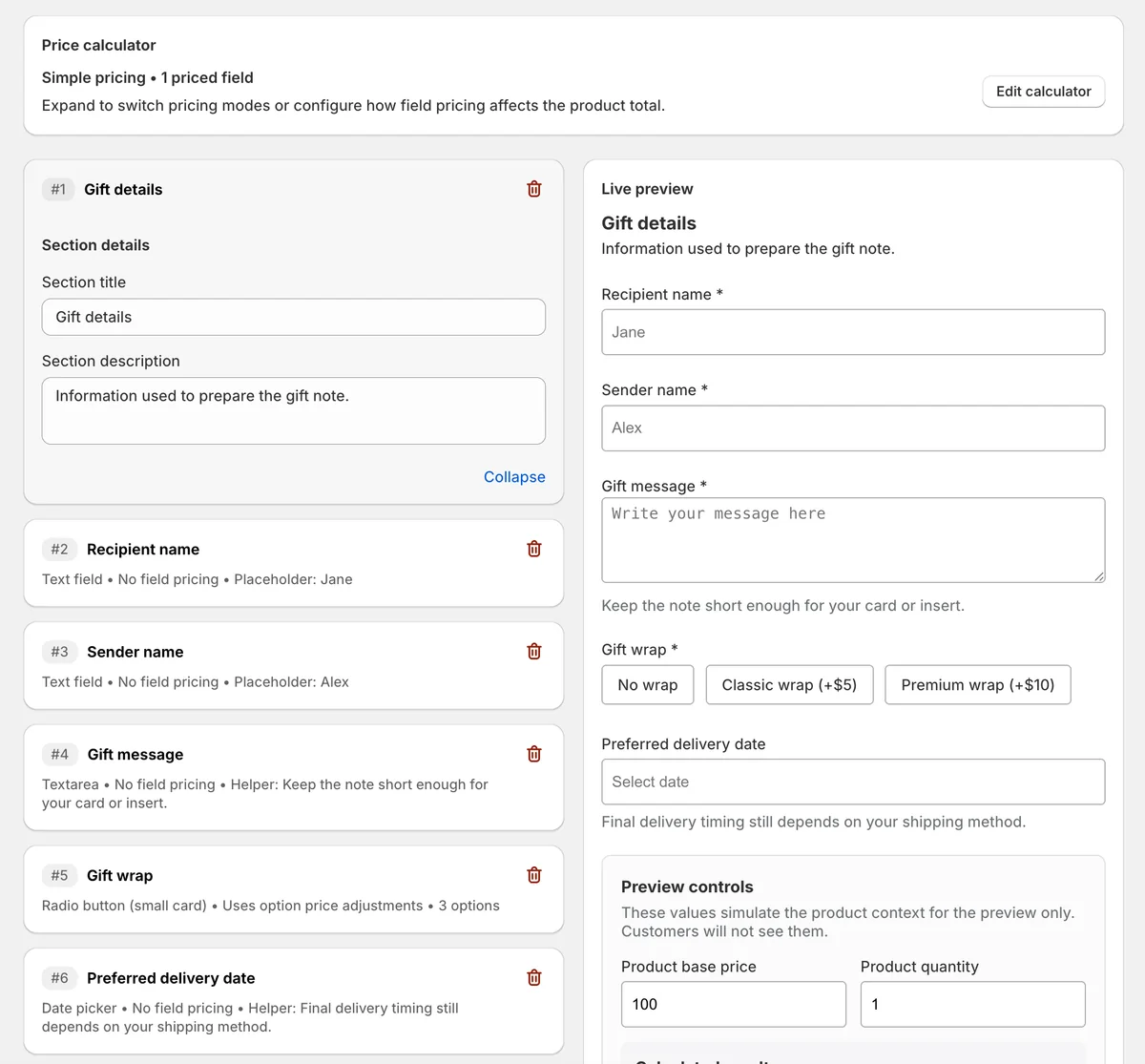
This app preview shows the COLY form builder and live preview together, so merchants can check required gift fields, option pricing, helper text, and shopper-facing inputs before publishing.
COLY fit
COLY is the best fit when product pages need structured form fields before checkout. Start with the getting started guide, then add conditional logic when the form should adapt to each shopper.
FAQ
When should I use custom fields instead of variants?
Use custom fields when the shopper needs to provide information, not choose from a fixed catalog option. Text, notes, dates, measurements, and instructions usually work better as fields.
Which fields should be required?
Only require information the team cannot fulfill the order without. Keep preference fields optional unless missing data would create a real operational problem.
Where should staff review custom field data?
Staff should be able to see the details in the order workflow and exports. Use clear labels so the captured data is easy to act on during fulfillment.
Collect custom order details before checkout
Use COLY when product options, personalization notes, delivery details, or required order fields need a cleaner settings layer.