

Spreadsheet tables for Shopify stores
Publish spreadsheet data on storefront pages without rebuilding the table by hand every time it changes.
Reviewed August 12, 2026.
Quick answer
Spreadsheet tables help when a Shopify store needs to show rows of data that already live in Excel, CSV, XLS, or Google Sheets. The use case is different from a product spec table: these tables often support catalogs, wholesale lists, size charts, technical references, product matrices, event schedules, or ordering. Table Master is the Activory app built for multi-row storefront tables, with search, sorting, pagination, styling, and optional Add to Cart controls. It can also create a table directly from Shopify products. Use the Shopify product table guide when Shopify, rather than a spreadsheet, is the source of truth.
When it helps
The source data starts in a file
Use spreadsheet tables when teams already maintain product, price, or reference data outside the product description.
Rows need search and sorting
Searchable tables help shoppers find the right product, part, size, or reference row without scrolling through a long page.
The table is bigger than a simple spec block
Pagination and column controls keep long data sets usable across mobile and desktop layouts.
Bulk ordering matters
Optional Add to Cart buttons can turn a data table into a faster ordering surface for repeat buyers.
Table ideas
- Wholesale price lists and repeat-order tables.
- Product catalogs with SKU, size, color, price, and inventory notes.
- Compatibility matrices for parts, devices, and accessories.
- Size charts or measurement references managed in a sheet.
- Event, class, rental, or service schedules.
Planning checklist
Start by deciding whether the spreadsheet is meant to inform, compare, or sell. A reference table may only need search, sorting, and clear columns. A wholesale table may need prices, variant names, quantity fields, and Add to Cart actions. A compatibility table may need filters or concise labels so shoppers can match the right part quickly.
Clean the source file before importing it. Remove duplicate header rows, merge cells, hidden notes, outdated columns, and internal-only comments. Storefront tables should use shopper-friendly labels, not warehouse shorthand. If a column heading only makes sense to the team, rename it before publishing.
Plan for mobile readers. A spreadsheet that looks comfortable on a laptop can become unusable on a phone if it has too many columns. Put the most important columns first, keep optional notes short, and decide which columns can be hidden or simplified. For large tables, search and pagination are usually more helpful than forcing shoppers through one long page.
Common mistakes
The biggest mistake is treating a storefront table like a raw spreadsheet dump. Shoppers do not need every operational column. They need the fields that help them find the right row, compare the options, and act. Another mistake is publishing inconsistent values, such as mixed units, different date formats, or half-filled SKU fields. Those details make a table feel less trustworthy.
For product tables with Add to Cart buttons, test the cart behavior in the theme. Some stores use cart drawers, some use cart pages, and some use custom cart interactions. A table that can add products should feel connected to the rest of the buying flow, not like a separate tool pasted onto the page.
Screenshot example
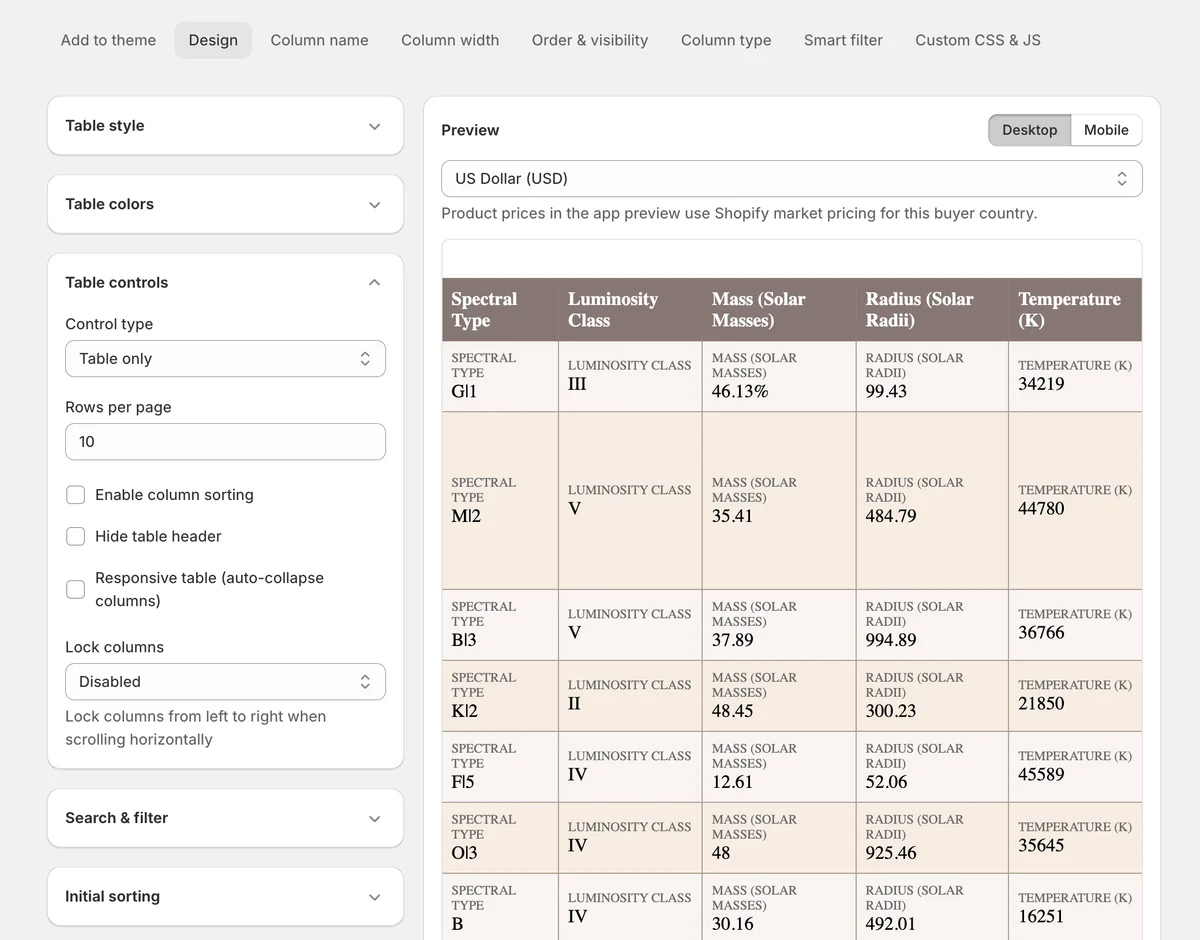
This app preview shows Table Master's design controls beside a live desktop table preview, so merchants can tune rows per page, sorting, responsive behavior, locked columns, and table styling before publishing.
Table Master fit
Table Master is a fit when a store needs a multi-row catalog, lookup table, or ordering table. The source can be Excel, CSV, XLS, Google Sheets, or Shopify products. Use this spreadsheet guide when a file or sheet is the source of truth. Use the Shopify product table guide when product and variant data should come from Shopify.
Google Sheets can pull updates into Table Master every six hours when automatic updates are enabled. This is not a real-time or two-way connection. Read the Google Sheets setup guide before you publish a frequently updated table.
FAQ
When should I use a spreadsheet table instead of a product spec table?
Use a spreadsheet table when the source is a sheet or file with many rows. Use a product spec table when each product needs a structured set of specifications.
How many columns should a storefront table have?
Use only the columns shoppers need to understand and act. If the source file has many operational columns, hide or remove the ones that do not help the buying decision.
Can a spreadsheet table support bulk ordering?
Yes, when the table includes product rows and clear Add to Cart controls. Table Master uses a separate cart action for each variant. It does not submit all selected variants in one final bulk action. Test the table with the store's cart behavior before publishing.
Can Table Master support more than 20,000 rows?
Yes. Public self-service plans include up to 20,000 database rows, but this is not a hard product maximum. Higher row limits are available by arrangement for larger catalogs, ordering tables, and lookup data. Contact Activory support with the expected row count, column count, data source, and filtering needs.
Turn spreadsheet rows into a storefront table
Use Table Master when Excel, CSV, XLS, or Google Sheets data needs search, sorting, pagination, styling, and optional Add to Cart buttons.