

Free shipping progress bar for Shopify stores
Help shoppers see how close they are to a reward while they are still deciding what to add to cart.
Quick answer
A free shipping progress bar works best when your store already has a clear cart goal and shoppers often stop just below it. The bar should show the current cart value, the remaining amount, and the reward shoppers unlock. For Shopify stores, BlueCart is the Activory app built for this workflow: free shipping goals, tiered discount milestones, cart quantity measurement, cart drawer placement, market-specific display rules, and multi-currency messages. BlueCart displays progress. The store must create and apply the matching shipping or discount rule.
Build the campaign
Start with a $100 free shipping goal and a $73 sample cart. Change the currency, threshold, messages, color, and cart value to test how the campaign will look. When the preview is useful, select Install BlueCart to open the Shopify App Store listing. This first version does not transfer the preview settings into Shopify.
Interactive campaign builder
Free shipping progress bar
Change the campaign and test it with a sample cart value.
Use the value from your Shopify free shipping rule.
Supported placeholder: {goal}
Supported placeholder: {remaining}
More controls in BlueCart
Install the app to turn this example into a campaign with:
- Product and collection rules
- Market, customer, and date targeting
- Country and currency goals
- Messages, layouts, colors, and icons
Opens the BlueCart listing in the Shopify App Store.
BlueCart displays progress. Create and test the matching free shipping rule in Shopify.
Storefront preview
Test before you use it
Your cart
$73.00
Need more than one goal? Compare the interactive multi-tier reward examples for discount ladders and shipping milestones.
Does the offer depend on the number of items instead of cart value? Try the cart quantity progress bar examples.
Do your shipping thresholds change by region or currency? Compare the free shipping progress bar examples by Shopify Market.
When it helps
The threshold is close enough to feel reachable
If your goal is only a little above the usual order value, shoppers can understand the next step quickly.
The cart drawer is a key buying moment
A visible cart progress bar can keep the reward in view while shoppers review items, quantities, and upsell offers.
Campaigns change by market or season
Display rules help you run different goals for regions, customer groups, or limited-time campaigns.
You want fewer custom snippets
A maintained app gives merchants settings, previewable designs, and support instead of fragile custom theme code.
What to show
- The reward shoppers can unlock, such as free shipping or a discount.
- The exact amount remaining before the reward is reached.
- A message that updates as the cart changes.
- A design that is visible but not louder than the checkout path.
- Backup upsell products when recommendations are not available.
Planning checklist
Start with the order data, not the banner design. A useful free shipping progress bar begins with your current average order value, shipping cost, gross margin, and the products shoppers usually add as a second item. If your average order value is $62, a $75 threshold may feel reachable. If the next natural add-on is $8, the message should make that step obvious. If the next add-on is $40, the threshold may feel less believable unless the reward is stronger.
Next, decide where the message belongs. Product pages are useful when shoppers compare bundles or accessories. The cart drawer is usually the most important placement because the shopper has already shown intent and can still adjust the cart. A floating progress button can help on longer browsing sessions, but it should not cover key theme controls or make checkout feel harder to reach.
Finally, write separate messages for three states: before the cart has enough value, when the shopper is close, and after the reward is unlocked. The unlocked state matters because it confirms that the shopper has reached the goal. Without that confirmation, the bar can feel like decoration instead of guidance.
Common mistakes
The most common mistake is setting the threshold too high because the store wants a larger order value. A goal that shoppers ignore does not lift AOV; it only adds noise. Another mistake is showing a progress bar for a reward that does not exist. Configure and test the discount or free shipping rule before the storefront message goes live. BlueCart displays progress, but it does not create or apply the reward.
Avoid using the same threshold in every market if shipping costs and currencies vary. A message that makes sense in one region may be confusing in another. Also avoid hiding the bar after the reward is unlocked. Shoppers need reassurance that the cart still qualifies, especially if they change quantities before checkout.
Screenshot example
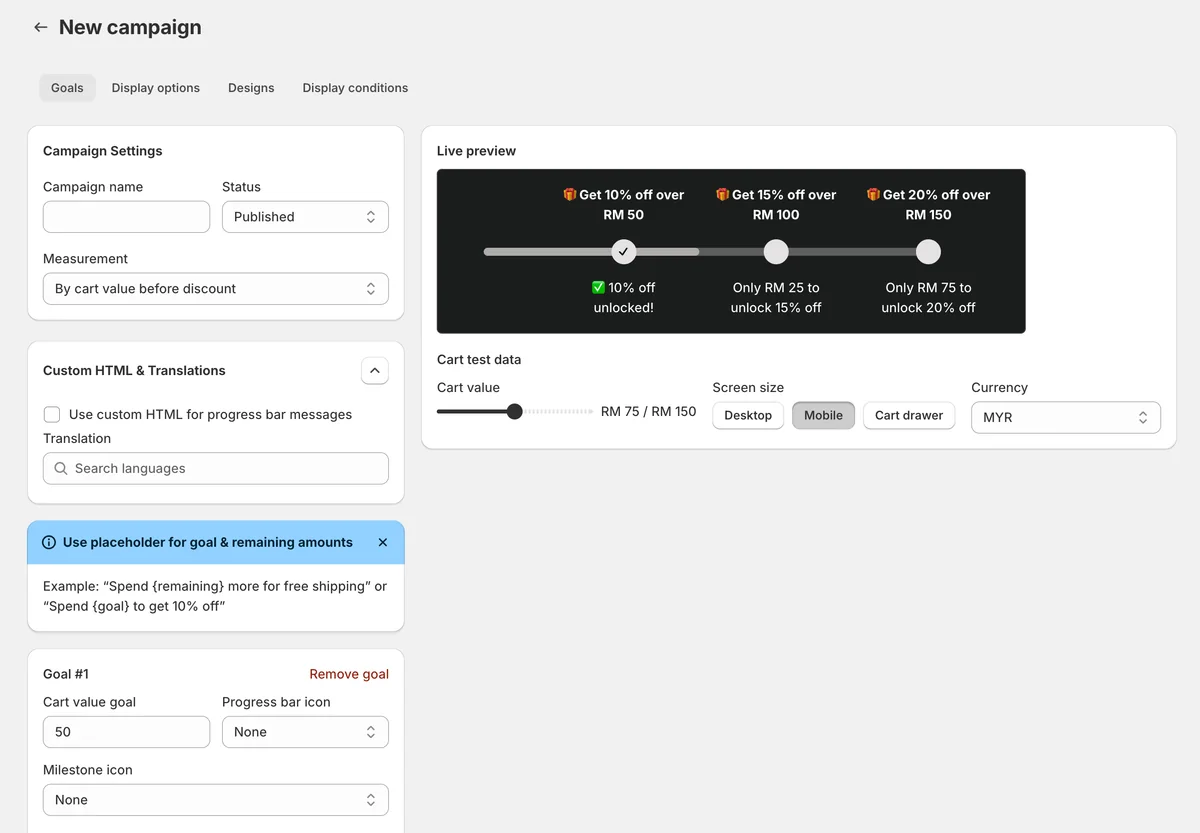
This app preview shows BlueCart's campaign builder and live preview together, so merchants can tune milestone goals, cart test data, screen size, and currency before publishing the progress bar.
BlueCart fit
BlueCart is a fit when the store wants to show one or more cart reward goals and related product recommendations. Pair it with the free shipping threshold calculator to choose a goal, then use BlueCart to show that goal in the cart, cart drawer, and storefront placements.
If one shipping goal is not enough, use the tiered rewards progress bar guide to plan several ordered milestones. When the reward rules are ready, follow the BlueCart launch guide to create, test, and publish the campaign.
FAQ
Should every Shopify store use a free shipping progress bar?
No. It works best when the store has a clear reward, healthy enough margin to support that reward, and add-on products that shoppers naturally buy together.
Is a cart drawer placement better than a product page placement?
Usually, yes. The cart drawer is closer to checkout, so the shopper can immediately see what is missing and add one more item. Product page placement is still useful when the store sells bundles, accessories, or related add-ons.
What should I test first?
Test the threshold, the message, and the placement. Start with one clear goal, then review order value, reward redemption, and whether shoppers are adding relevant products.
Turn the threshold into a visible cart goal
Use a BlueCart app block on standard theme sections, or follow the shortcode guide when a cart drawer or custom template needs code placement.